Azure Managed HSM External Key Management
Azure Managed HSM external key management enables Azure services to use encryption keys that are stored outside of Azure in a customer-managed HSM. This feature supports regulatory and sovereignty demands by ensuring cryptographic material resides under the customer’s governance rather than the cloud provider’s. Through the Securosys EKM Proxy, customers can connect their Securosys Primus HSM or Securosys CloudHSM to Azure.
External key management keeps cryptographic key operations and control wholly outside Azure's environment, never moving the keys into the cloud. Azure services call out to the external HSM for cryptographic operations. The connection between Azure and the external HSM is done through an "EKM Proxy". This is in contrast with Azure Bring Your Own Key (BYOK), which allows customers to generate keys outside the cloud and permanently import them into Azure Key Vault for in-cloud use.
Azure EKM stems from compliance and audit requirements in regulated industries (financial services, healthcare, government, data sovereignty regimes) where independent proof of custodian control is mandated. Customers pursuing these models require FIPS 140-3 Level 3 or higher HSM certifications, Common Criteria validations, and stringent logging/audit trails to satisfy auditors and regulators that key material and usage are outside cloud provider access and control, reducing risks of unauthorized access and satisfying legal requirements around data sovereignty and third-party access.
The connection between Azure Managed HSM and Securosys HSM is enabled through the Securosys External Key Management (EKM) Proxy, which acts as a mediation layer between Azure workloads and dedicated HSM Partitions. The Proxy securely connects Azure Managed HSM to a Securosys CloudHSM or an on-premise Securosys Primus HSM. The Proxy is deployed as a Docker container in a customer-controlled environment, including Azure cloud or on-premise infrastructure.
Integration with Securosys Primus HSM and CloudHSM
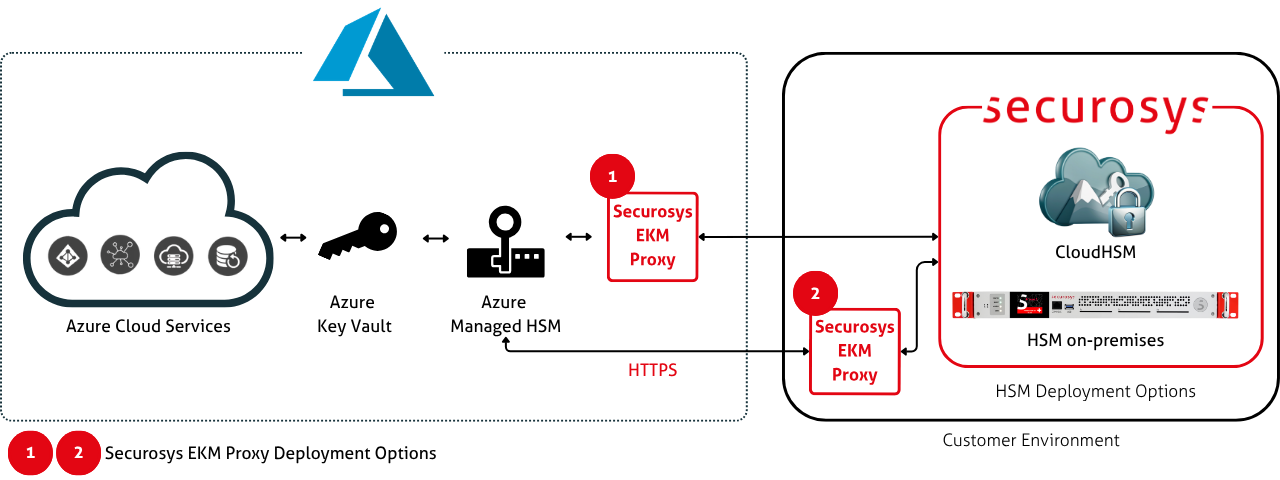
Securosys provides a dedicated Securosys External Key Management Proxy for Azure Managed HSM (abbreviated as EKM Proxy) that implements the Azure EKM Proxy API. This enables Azure Managed HSM to use an on-premise Primus HSM or a CloudHSM as an external keystore.
This proxy is developed, maintained, and supported by Securosys, and is distributed as an easy-to-deploy Docker container. The EKM Proxy is responsible for translating and forwarding the requests from Azure to your Primus HSM or CloudHSM Partition.
Deployment
The setup process is straightforward: Users deploy the proxy container in a Docker environment of their choice. Users then configure the proxy with credentials to connect to their Primus HSM or CloudHSM Partition and with mTLS credentials to connect to Azure Managed HSM.
For more information on how to deploy the Securosys proxy see the Installation section.
Operation
The request flow between Azure and the customer environment looks as follows:
- An Azure service calls Azure Managed HSM to perform a cryptographic operation using an external key.
- Azure Managed HSM relays the request to the Securosys EKM Proxy.
- The proxy forwards the request to the Securosys HSM.
- The Securosys HSM executes the cryptographic operation.
- The result is returned on the same path back to the requesting Azure service.
Security
The connection between Azure Managed HSM and the Securosys EKM Proxy is secured using mutual TLS (mTLS). This ensures that both Managed HSM and the EKM Proxy authenticate each other before any cryptographic operation is processed. It also ensures confidentiality of the request and its result.
The connection between the Securosys EKM Proxy and the Securosys HSM goes through the JCE API. It uses a proprietary protocol, secured by the Setup Password that is shared out-of-band.
Private key material never leaves the secure boundary of the HSM. Neither the EKM Proxy nor Azure have access to the keys, only to the results of the operations.
Key Management
The Proxy API is limited to forwarding cryptographic operations between Azure and external HSMs. It does not provide functionality for key lifecycle management within the external key management system. Keys must be created and managed directly within the Securosys HSM environment before they can be added as an external key in Azure Managed HSM.
Securosys CyberVault KMS provides an easy-to-use web interface for key management. Additionally, keys can be created using any of the standard HSM APIs.
Multi-Tenancy
A single Securosys EKM Proxy instance can serve multiple Azure Managed HSM pools. To support this architecture, the proxy URI includes an optional path prefix that allows logical separation of tenants or individual Managed HSM pools while using the same proxy service.
However, every Securosys EKM Proxy instance can only be connected to a single Securosys HSM Partition. If you have multiple Partitions, you need to deploy multiple proxy instances.
Performance Requirements
For proper operation, the Securosys EKM Proxy is expected to respond to API requests within 250 milliseconds. If Azure Managed HSM does not receive a response within this time window, the request will time out. It is recommended to deploy the EKM Proxy and the HSM in a location that is geographically close to your Azure region.
Compatibility
Azure Managed HSM external key management using a Securosys HSM works with all Azure services that support customer-managed keys (CMK). For a list of services, see the Azure documentation.
The Securosys EKM Proxy works with both on-premise Primus HSM and CloudHSM. The Securosys EKM Proxy supports the full Azure EKM Proxy API specification.
Next Steps
- Read the quickstart guide for an overview of the installation steps.
- Follow the installation guide to set up Azure external key management with a Primus HSM or CloudHSM.
- Download the Securosys EKM Proxy.
- Read the Azure Managed HSM documentation to learn more about external key management.