Air-Gapped profile Transaction Security Broker (TSB)
This section requires prior knowledge of the Transaction Security Broker (TSB) and its various components. We highly suggest reading through the TSB documentation Transaction Security Broker - Introduction.
Modern financial and digital asset systems require granular access controls for transaction authorization. These controls often involve group-based permissions, quorum approvals, time-based constraints, or combinations thereof. Securosys Smart Key Attributes (SKA) enable enforcement of such advanced authorization policies.
Due to critical incidents, such as a major blockchain transactions being mistakenly executed directly from cold storage1, organizations are adopting stricter security postures. This includes isolating their cryptographic keys within Hardware Security Modules (HSMs) located in air-gapped environments2.
In such deployments, HSMs are physically disconnected from external networks and cannot directly communicate with the TSB or business applications. As a result, transaction approval must occur in person, requiring physical access to the HSM environment.
To support such use cases, the "Air-Gapped" Profile TSB was developed.
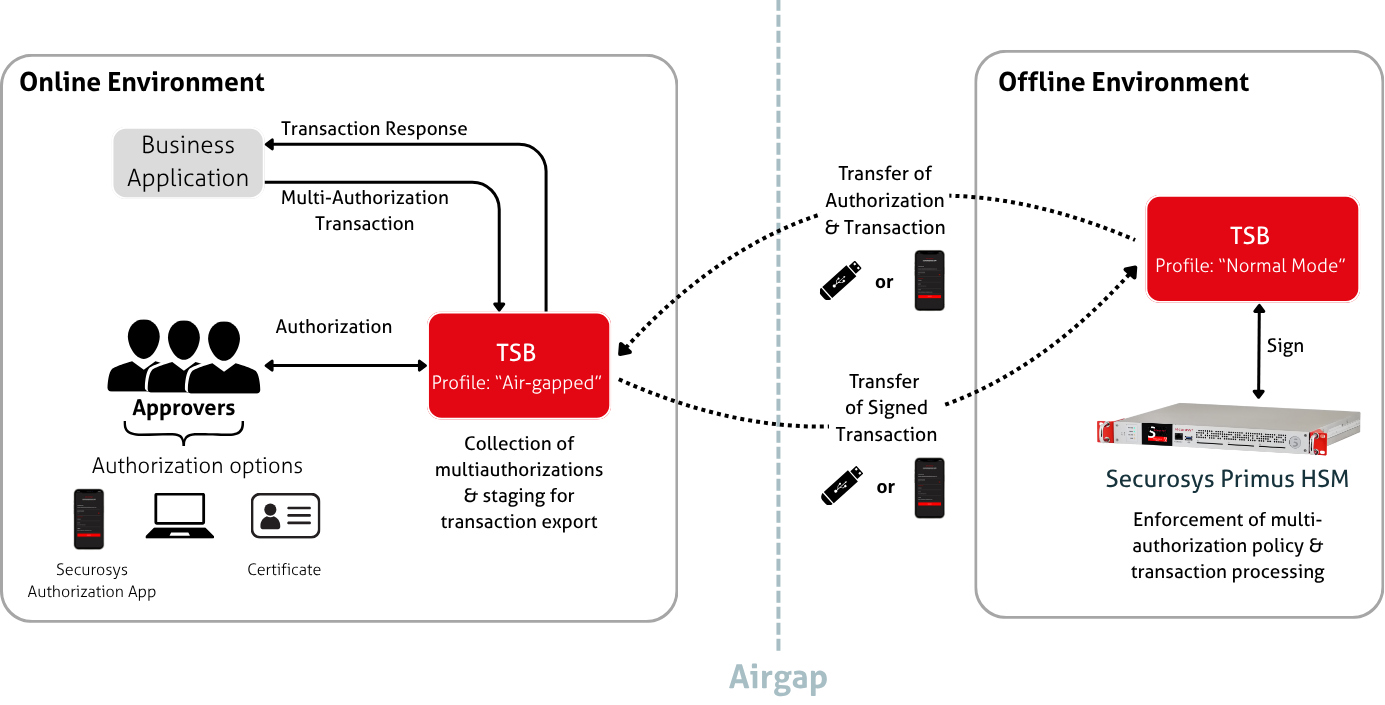
How It Works
The Air-Gapped deployment architecture contains two TSB instances:
- One TSB with the "Air-Gapped" Profile that is online and not connected to any HSM.
- One TSB with the "Normal" Profile that is in the offline environment and connected to the HSM.
The "Air-Gapped" Profile TSB collects the requests from the business application and creates approval tasks for the Approvers to fetch and authorize. The multi authorizations are collected and staged for the export of the transactions to be later transported to the offline environment where the transaction can be signed.
Transactions to be signed and their approvals are carried to/from the offline environment using a USB stick or the Securosys Authorization App.
The application-air-gapped.yml configuration file is very similar to a "Local" Profile TSB,
only with hsm.airGapped: true and without any HSM credentials.
Capabilities
The "Air-Gapped" Profile TSB retains the core workflow engine of a standard TSB instance. Same as the standard TSB, the "Air-Gapped" Profile TSB does not contain any cryptographic material. It supports the following request types.
Cryptographic operation requests:
- Sign (
POST /v1/sign), - Modify (
POST /v1/modify).
Request operations:
Get existing requests
- Get all requests (
GET /v1/request) - Get a specific request by id (
GET /v1/request/{id}) - Get a specific request and generate the output as QR code (
GET /v1/request/qrCode/{id})
Delete existing requests
- Delete all requests (
DELETE /v1/request) - Delete a specific request by id (
DELETE /v1/request/{id})
Service information requests:
- TSB version (
GET /v1/versionInfo) Approval task operations: - Retrieve approval tasks (
POST /v1/filteredSignApprovalTask,POST /v1/filteredModifyKeyApprovalTask,POST /v1/filteredAllApprovalTask) - Submit approvals (
POST /v1/approval) - Delete completed or obsolete tasks (
PATCH /v1/task) - Insert results back into TSB (
PUT /v1/resultFromOfflineHsm)
What's next?
- An introduction to Smart Key Attributes
- Learn how to create an SKA key (under normal conditions).
- Follow the Installation guide for a step by step procedure on how to setup and configure the "Air-Gapped" Profile TSB.
- View the example Workflow for a detailed explanation of the process of a signing request.